Are WiFi Boosters Worth It? 7 Downfalls Nobody Tells You About
Zak
1 November 2026
→ Skip The Boosters: Get WiFi Fixed For Good
We walk into a lot of homes with a WiFi problem, and we can usually guess the story before anyone says a word.
There's a white plug-in box in the hallway, sometimes a second on the landing. It went in after the back bedroom stopped working. It helped for a week, or it never helped at all, and now nobody's quite sure what it's doing.
So, are WiFi boosters worth it? For most homes, no. They're cheap, they're easy, and they make your phone show more bars. But more bars isn't the same as better WiFi.
Key Takeaways
- A WiFi booster repeats the signal it receives, including a weak one
- Most boosters cut your speed, often by around half
- Your phone can stay stuck on the wrong box
- Boosters add delay, which hurts calls and gaming
- They rarely fix a real dead zone, because they have to sit where the signal already works
- Wired access points avoid every one of these problems
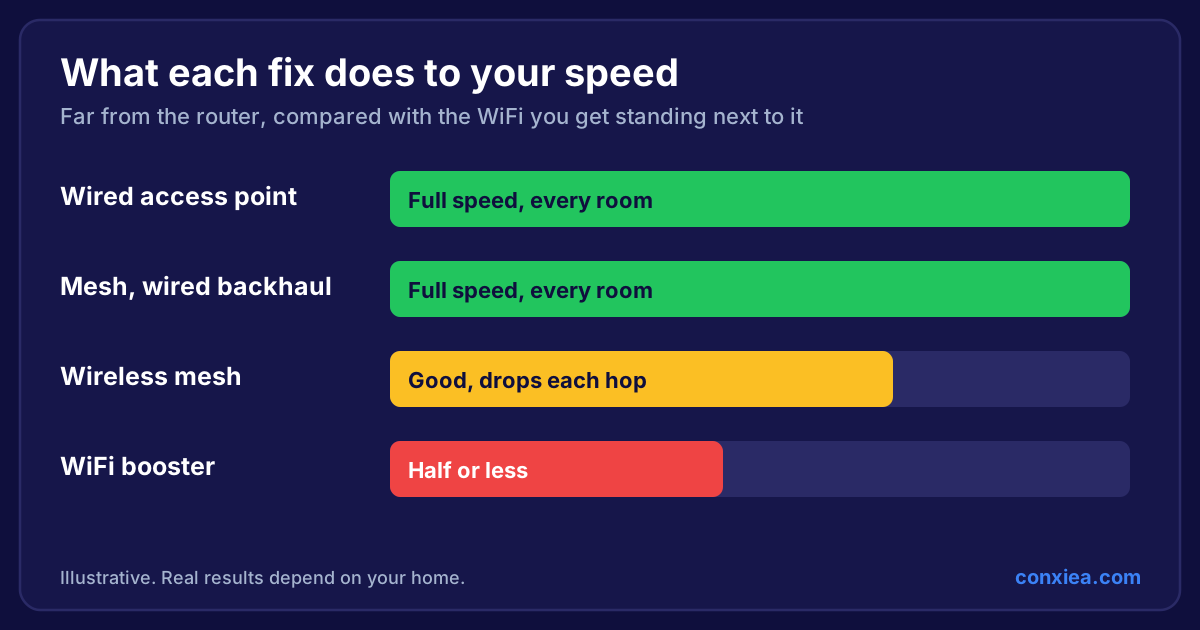 Bar chart comparing speed far from the router: wired access points and wired mesh give full speed, wireless mesh is reduced, and a WiFi booster gives half or less
What It's Actually Like Living With a WiFi Booster
Nobody buys a booster because they love networking. They buy one because the kids can't watch anything upstairs, or a Teams call just froze.
Then it goes something like this:
- The phone shows full bars, but pages still won't load
- The TV buffers at the same point in every film
- You have to turn WiFi off and on again to get it working
- Calls drop as you walk from room to room
- Someone suggests a second booster
It isn't your fault. The box promised "up to" a big speed, and nothing on the packaging mentions the downfalls below.
The 7 Downfalls of WiFi Boosters
1. It repeats a weak signal
A booster can't create a better signal. It takes whatever arrives and sends it on. If the signal reaching it is poor, you get a louder copy of a poor signal.
2. It cuts your speed
A basic booster uses one radio to talk to both your router and your devices. A WiFi radio can't send and receive at the same time on one channel, so the same airtime gets used twice. That's why speed often falls by around half. Dual-band models do better, but they still lose out to a cable.
We cover the technical side in why WiFi extenders don't work.
3. It has to sit where you don't need it
This is the catch. For a booster to work, it needs good signal, so it has to go about halfway to the problem room. It can't go in the dead zone itself. Often the only free socket is in the wrong place, behind furniture or low down near the skirting board.
4. Your devices get stuck on the wrong box
Phones and laptops tend to cling on to the network they're connected to, even when a stronger one is closer. So you can be sat next to the booster while your phone hangs on to the router through two walls.
5. It adds delay
Every wireless hop adds a little lag. You won't notice on Netflix. You will notice on a video call, or in an online game, and it's why gaming and calls are two of the first things to suffer.
6. It adds to the noise
Your WiFi shares the airwaves with your neighbours and with your own devices. A booster adds another radio repeating the same traffic, which can make things busier, especially when two are running.
7. It's another thing to manage
Boosters can need their own setup, can create a second network name, and often get forgotten. If yours hasn't been updated since the day you plugged it in, it's an unmanaged device on your home network. See our home network best practice for what good looks like.
"But Mine's a WiFi 7 Booster"
Newer boosters are better, and WiFi 7 has some clever features. But the basic problem stays the same: the signal still has to travel through the air, through your walls, to reach the booster. Better radios can't remove a stone wall.
When Is a WiFi Booster Worth It?
There are a few cases where one is reasonable:
- You're renting and can't run any cable
- You need one light-use device online in a small flat
- It's a short-term fix while you sort something better
If you need reliable WiFi for work, streaming or a smart home, or you're trying to reach a garden office, a booster won't do the job.
What Works Instead
| Option | What it does | Best for |
|---|---|---|
| WiFi booster | Repeats the signal through the air | Short-term, light use |
| Wireless mesh | Smarter system, still wireless between units | Smaller homes with few thick walls |
| Mesh with wired backhaul | Mesh units connected by cable | Most family homes |
| Wired access points | Full connection delivered by cable | Homes that need every room to work |
The difference is the cable. A wired access point gets its connection through a wire, so it doesn't lose anything crossing your house. Your WiFi only has to travel the last few metres to your device.
For the full comparison, read extender vs mesh vs wired access points.
 Conxiea engineer beside a ceiling-mounted WiFi access point
Frequently Asked Questions
Do WiFi boosters actually work?
They can improve signal in an area that's only slightly weak. They rarely fix a true dead zone, and they usually reduce speed.
Is a WiFi booster the same as an extender?
Yes, in practice. Booster, extender and repeater are used for the same kind of device, and they all share the same downfalls.
Why does my booster show full bars but no internet?
Full bars only show the connection between your device and the booster. The link from the booster back to your router may still be weak, and that's the part that matters.
Are two boosters better than one?
Usually not. Linking boosters together adds more delay and loses more speed each time.
What's better than a WiFi booster?
Wired access points are the best option, followed by mesh with a wired connection between units.
Had enough of boosters?
We'll survey your home, fit proper access points and test every room before we leave. No extenders, no guesswork, one fixed price, and if it isn't fixed, you don't pay. We cover homes across the South West.
→ Get Your Home WiFi Installed Properly
Or speak to a local home WiFi installer about your house.