Is WiFi 7 Worth It for Your Home? A UK Guide for 2026
Zak
1 November 2026
→ Get WiFi That Works In Every Room
WiFi 7 is everywhere right now. New routers, new mesh kits, new phones. And the UK has just given it a boost: from 10 November 2026, new Ofcom rules open up more of the 6 GHz airwaves for licence-exempt WiFi.
So should you upgrade? If your WiFi is already reaching every room, WiFi 7 can be a nice improvement. If you've got dead zones, it won't fix them.
Here's what it really changes for a UK home.
Key Takeaways
- WiFi 7 brings wider channels, faster data and Multi-Link Operation
- You only get the benefits on devices that support it
- 6 GHz is fast but doesn't travel well through walls
- A WiFi 7 router alone won't fix dead zones
- WiFi 8 is still a draft, with final approval expected in 2028
- Where you put your WiFi matters more than which number it has

What Is WiFi 7?
WiFi 7 is the common name for the IEEE 802.11be standard, which was published in July 2025. According to the Wi-Fi Alliance, the main upgrades are:
- 320 MHz channels in the 6 GHz band, twice as wide as WiFi 6, delivering twice the throughput
- 4K QAM, which packs in more data for 20% higher transmission rates
- Multi-Link Operation (MLO), which balances traffic across links to improve speed and reliability
MLO is the one to watch for homes. Older WiFi connects a device on one band at a time. MLO can use more than one, so traffic has somewhere else to go when one gets busy.
WiFi 5, 6, 6E, 7 and 8 Compared
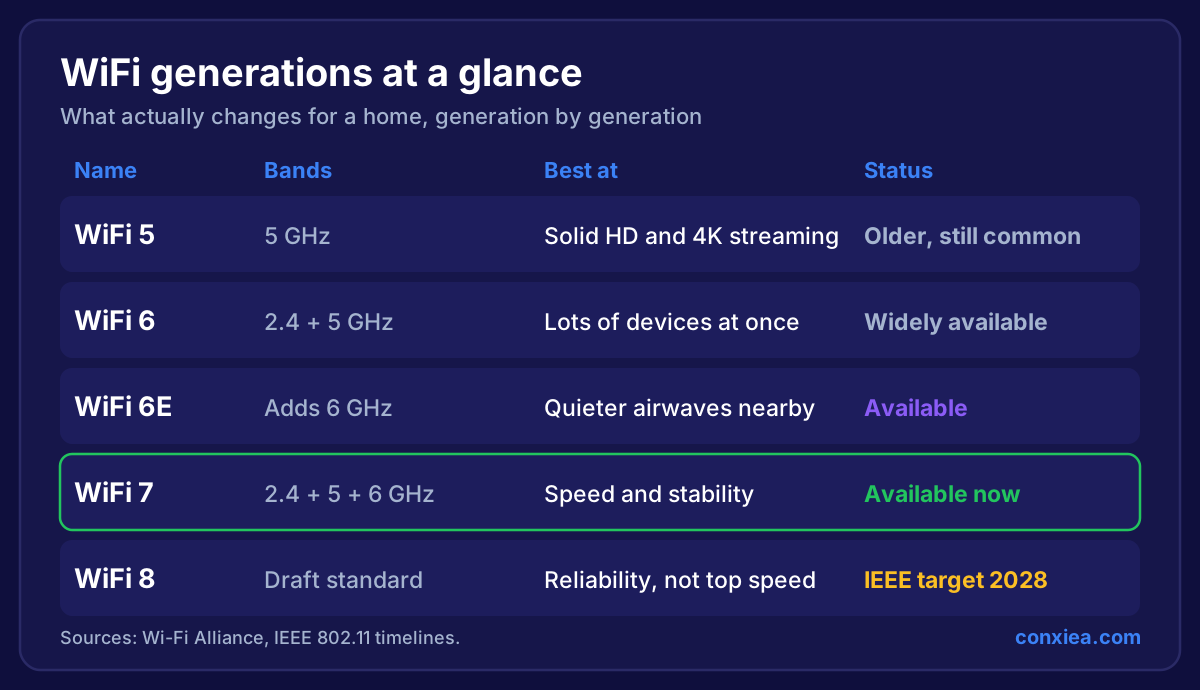 Table comparing WiFi 5, 6, 6E, 7 and 8 by bands, what each is best at, and status. WiFi 8 is a draft with an IEEE target of 2028
What the New Ofcom 6 GHz Rules Mean
The 6 GHz band is the quiet new space for WiFi, away from the crowded 2.4 GHz and 5 GHz bands.
Ofcom's rules extend licence-exempt WiFi from 5925–6425 MHz to 5925–6585 MHz. That's an extra 160 MHz. In the new section, low-power indoor use is allowed on the same basis as before, and outdoor or higher-power use needs a coordination system.
For you, that means more room for fast WiFi indoors, especially in busy streets and flats. You won't need to do anything, and how much you benefit will depend on your kit.
What WiFi 7 Won't Do
It won't fix dead zones
This is the big one. 6 GHz has great speed but shorter reach than the older bands, and it's more easily stopped by walls. Your dead zone is usually caused by walls and distance, and a new router has the same walls to get through.
It won't help older devices
A WiFi 5 laptop on a WiFi 7 router still works as a WiFi 5 laptop. Your smart devices mostly use 2.4 GHz, so they won't see any difference at all.
It won't make your broadband faster
WiFi carries your connection around the house, it doesn't make it bigger. If you pay for 150 Mbps, WiFi 7 won't give you more than that from the internet.
It won't cross the garden
The same goes outdoors. If you're trying to reach a shed or garden room, you need a cable or a bridge, as we explain in how to get WiFi in a garden office.
A WiFi 7 booster is still a booster
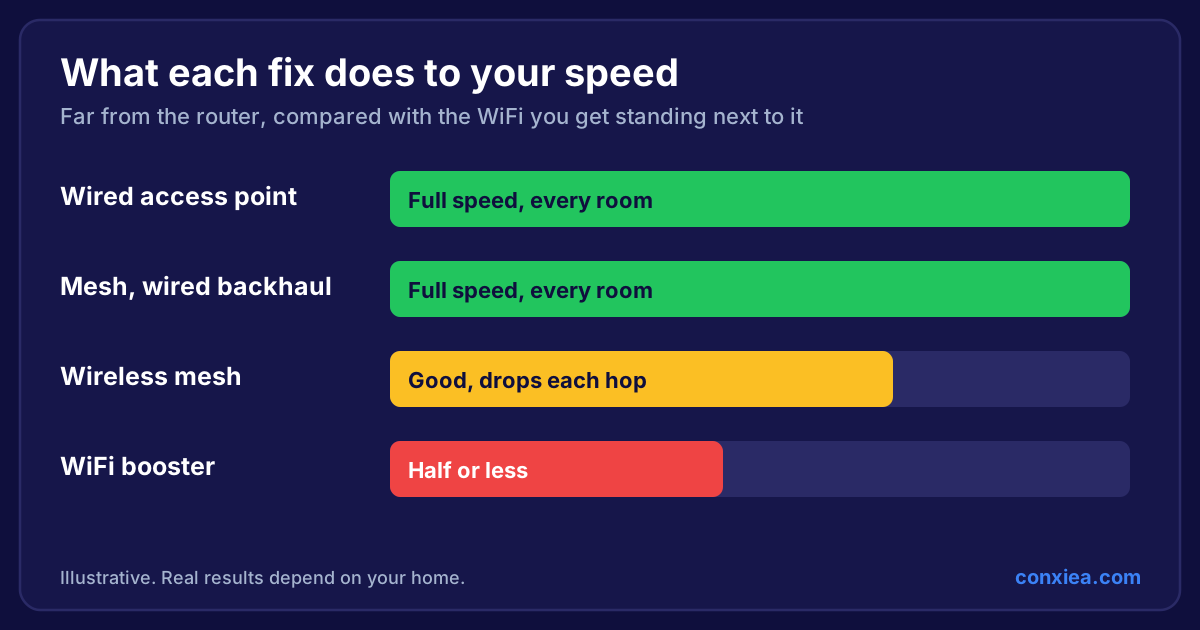
The word "WiFi 7" on the box doesn't remove the downfalls of WiFi boosters. It's still repeating a signal through your walls.
When Is WiFi 7 Worth It?
It's worth it if:
- You have full fibre and want every bit of that speed around the house
- You own recent phones and laptops that support it
- Your home has lots of devices running at once
- You're installing wired access points anyway and want to future-proof them
It's probably not worth it if:
- Your problem is one or two rooms with poor signal
- Most of your devices are a few years old
- You're mainly streaming and browsing
Adoption is still early too. Ookla data put WiFi 7 at 7.2% of US routers in Q1 2026, up from 1.8% a year earlier, so you won't be left behind if you hold off.
Should You Wait for WiFi 8?
Probably not. WiFi 8 (802.11bn) is still being written. The IEEE's own timeline predicts final approval in 2028, and early products built on a draft standard may not match the finished version.
Interestingly, WiFi 8 is focused on reliability, not higher top speeds. That tells you something: the industry knows speed isn't the main problem any more. Stable WiFi across the whole home is.
That's also the part you can fix today.
What to Do Instead of Chasing Numbers
Whichever WiFi generation you choose, the order of importance is the same:
- Coverage first: get signal into every room you use
- Cable second: connect access points by wire so nothing's lost across the house
- WiFi generation third: choose WiFi 6 or 7 access points to suit your devices
A well-placed WiFi 6 access point on a cable will beat a WiFi 7 router in a cupboard, in the rooms furthest away. For the bigger picture, see what home WiFi can do when it's set up properly.
Frequently Asked Questions
Is WiFi 7 faster than WiFi 6?
Yes, on supported devices. The Wi-Fi Alliance says 320 MHz channels deliver twice WiFi 6's throughput, and 4K QAM adds 20% higher transmission rates. Real speeds in a home will be lower than the numbers on the box.
Do I need a new phone for WiFi 7?
To use its features, yes. Older phones still connect, but at their own generation's speed.
Can WiFi 7 go through walls better?
No. Its 6 GHz band has less reach through walls than 2.4 GHz and 5 GHz. A WiFi 7 router still uses those older bands too, so your coverage won't get worse, but it won't magically improve.
Is WiFi 8 out yet?
Not as a finished standard. The IEEE predicts final approval in 2028.
Want WiFi that works in every room, whichever number's on the box?
We survey your home and fit the right access points for your house and devices, with no overselling. One fixed price, every room tested, and if it isn't fixed, you don't pay. We cover homes across the South West.
→ See Our Home WiFi Installation Service
Or talk to a local home WiFi installer about what your home needs.