Why WiFi Extenders Don't Work (And What Actually Fixes Dead Zones)
Zak
20th October 2026
You bought a WiFi extender, plugged it into the landing, and the back bedroom is still useless. Or it works for a day, then your phone sits on one bar while video calls freeze.
It isn't your fault, and it usually isn't your broadband. Extenders are built to be cheap and easy to sell, not to give you reliable WiFi. It's the most common thing we find when we carry out a home WiFi installation. This guide explains why they so often let you down, and what actually fixes dead zones for good.
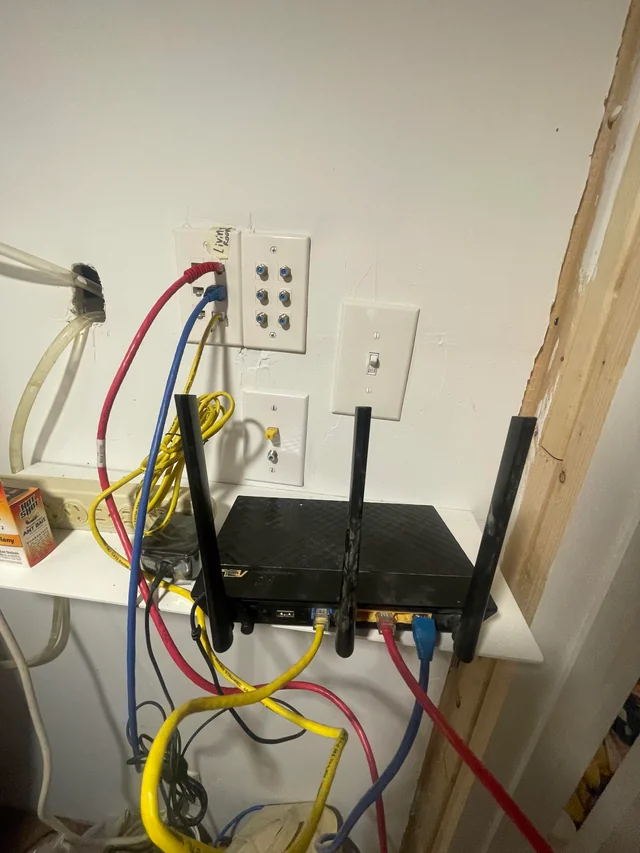 Messy home router setup with tangled cables, a common cause of WiFi dead zones
Key Takeaways
- An extender can only repeat the signal it receives. If that signal is weak, you get a weak signal, just louder.
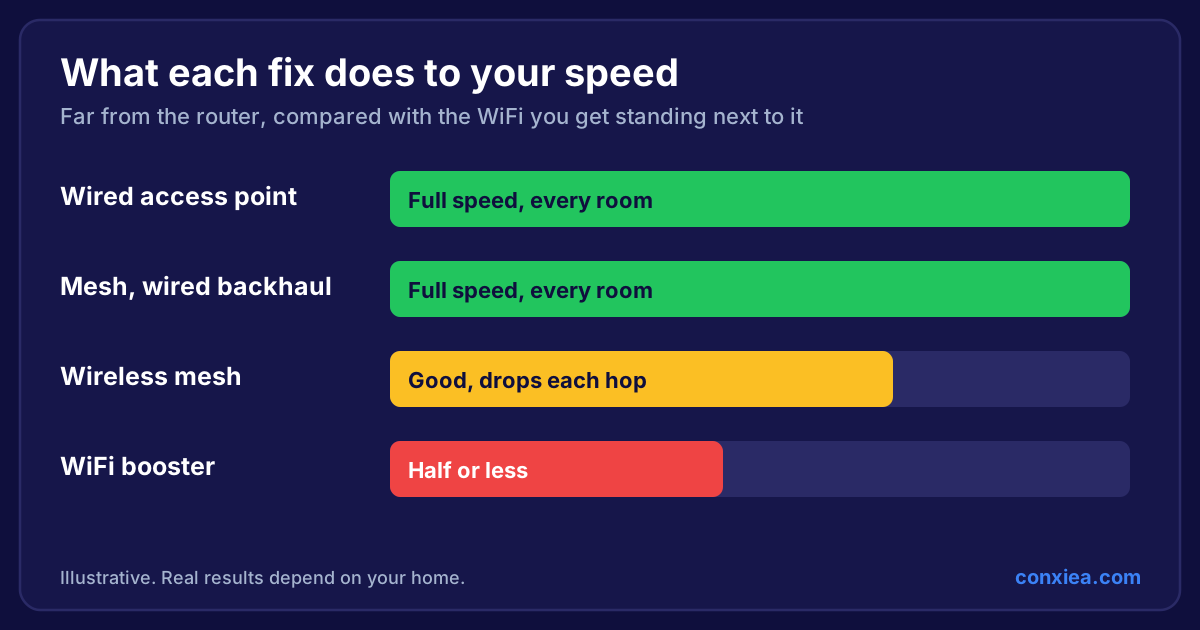
- Most extenders use the same radio to listen and to talk, which can roughly halve the speed for everything connected to them.
- Devices often cling to the wrong box, so you stay on a poor connection even when a better one is nearby.
- The reliable fix is access points connected back to your router by a cable, so every room gets a full-strength signal.
What a WiFi Extender Actually Does
An extender (also sold as a booster or repeater) sits between your router and the rooms that can't get signal. It listens to your router's WiFi, then rebroadcasts it.
That sounds sensible, but it has a built-in problem: the extender can only pass on what it receives. To do any good, it has to sit somewhere with a decent signal from the router, yet close enough to the dead zone to reach it. In most homes, that sweet spot either doesn't exist or is in the middle of a wall.
Reason 1: It Repeats a Weak Signal
Put an extender where your WiFi is already struggling, and it faithfully repeats a struggling connection. Your phone shows full bars because it's close to the extender, but the link between the extender and the router is the real bottleneck.
That's why so many people see "full signal" and still can't load a web page. The bars tell you how close you are to the extender, not how good your connection to the internet is.
Reason 2: It Halves Your Speed
Most plug-in extenders have one radio per band. That radio has to talk to the router and talk to your devices, taking turns on the same channel. Every bit of data is sent twice through the air, so the usable speed can drop by around half, and more if the extender is far from the router.
If you pay for fast broadband, a single repeater can throw a large chunk of it away before it reaches the back of the house.
Reason 3: Your Devices Get Stuck on the Wrong Box
 Frustrated man with WiFi dropouts next to a happy man working with reliable WiFi
Many extenders create a second network, often with "_EXT" on the end of the name. Your phone or laptop then has to decide which one to join, and it usually holds on to whichever one it joined first, long after you've walked away.
So you carry your phone from the kitchen to the bedroom and it stays clinging to the router downstairs, on one bar, instead of switching to the extender in the next room. Calls drop mid-sentence and nobody knows why.
Reason 4: Thick Walls and Modern Insulation
Homes across the South West are hard on WiFi. Older properties in Bristol, Bath and Somerset often have thick stone or solid brick walls. Newer builds use foil-backed insulation and plasterboard, and underfloor heating and metal-framed doors all soak up signal.
An extender doesn't get round any of that. It's still sending its signal through the same walls the router couldn't get through.
What Actually Fixes WiFi Dead Zones
The fix is to bring the internet connection closer to where you use it, by cable, not through the air.

Wired access points (the professional fix)
An access point is a WiFi transmitter connected back to your router with a network cable. Because the cable carries the full connection, every access point delivers full speed, wherever it is in the house. Ceiling-mounted access points also cover rooms evenly, rather than blasting one corner.
Set up properly, all your access points share one network name, and your devices move between them smoothly as you walk round the house. That's how offices, hotels and hospitals do it, and it works just as well in a home.
Mesh with a wired backhaul (a strong middle ground)
A good mesh system is a big step up from an extender, because the units work together as one network and help your devices roam. It works best when each mesh unit is connected back to the router by cable (called a wired backhaul). Without cables, the units fall back on talking to each other wirelessly, which brings back some of the same problems as an extender.
We compare all three options in detail in WiFi Extender vs Mesh vs Wired Access Points.
Are WiFi Extenders Ever Worth It?
There are a few cases where an extender makes sense:
- A single, small dead spot just outside good coverage.
- A temporary fix while you plan something better.
- A rented home where you can't run any cables at all.
For whole-home coverage, working from home, or a busy family, they're the wrong tool. Our step-by-step guide on how to get WiFi in every room shows what to do instead, and if you'd like to do it yourself, see how to build your own home network.
Frequently Asked Questions
Why does my extender show full bars but no internet?
Because the bars show how strong your connection to the extender is, not the extender's connection to your router. If the extender sits in a weak spot, it repeats a weak connection.
Is a mesh system the same as an extender?
No. Mesh units are designed to act as one network and handle roaming far better. But wireless-only mesh still sends data through the air between units, so a wired backhaul gives much better results.
Do I need to upgrade my broadband to fix dead zones?
Usually not. If you get good speeds next to the router but poor speeds elsewhere, the problem is how the WiFi is spread round your home, not the broadband coming in.
Where Conxiea Fits
At Conxiea, we survey your home, find where the signal fails, and install wired access points so every room gets full-strength WiFi. It's one fixed price, with a no-fix, no-fee guarantee, for homes across the South West.